Making a Replacement Miracle Serial Cable |
|||||||
by
John M. Zeigler, Ph.D. |
 or
or
 below
below

| T | |
he original equipment "Miracle cable" for the IBM-PC version of the Miracle is an Antex AWM E101344 Style 2464 VW-1 serial port cable. Antex no longer makes the cable or any of the other parts for the Miracle Piano Teaching System that it made originally. You can consider making your own serial cable or have one made. Read on to learn more about how to make your own replacement serial cable for the Miracle on IBM-PC-AT compatibles, the Apple Macintosh, SNES, Genesis and the Commodore Amiga. Please note that a MIDI cable can also be used with the IBM-PC and Macintosh versions and is preferred in most cases, since the MIDI cable allows the Miracle keyboard to be used with other MIDI-compatible software. The serial cable is entirely proprietary. See our Miracle Piano Teaching System FAQ for more information on using a MIDI cable.

Making an IBM-Type Serial Cable
A support archive for the old JumpMusic site at web.archive.org displayed the pinouts for the serial cable. The pinout diagram is reproduced below, with thanks to web.archive.org and JumpMusic.
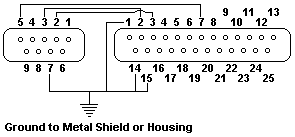
A visitor writes:
I found another web site (http://www.electrongate.com/wpd/atcab.pdf) which is by one of the original designers of the Miracle Piano. His cable differs in one respect, the 13,14,7 pins of the 25 pin end connect to pin 5 of the 9 pin and not pin 7 as is posted in the "correction" to your original posting which also does not have pins 13,14,7 tied together. I can assure you that 2-3, 3-2, and 13,14,7 - 5 is the CORRECT way to make this cable. As soon as I tried this my Miracle Piano worked without a hitch!
If you're technically inclined and would like a little more information on the technical specifications for the keyboard, you can find those here. I have written to one of the developers of the Miracle (the link above takes you to his web site). He confirms that the diagram linked here, and shown above, is correct. Our page, Instructions for Making a Miracle Piano Replacement Serial Cable, provides additional information for those who may want to make their own serial cable for the Miracle.
Other IBM and Macintosh Information
One of our visitors has contacted Antex Customer Support for cable
information and received the following reply: "The Miracle has been out of
production for many years.
Spare parts, software, etc. are no longer available.
If you are looking for power adapters or cables the specifications are as
follows:
AC AdapterOutput: 12VAC (no polarity), 1 Amp |
IBM PC Cable Pin outsDB-25 Male DB-25 Female1, 7, 14 -------------- 7 2 -------------------- 2 3 -------------------- 3 |
IBM PC AT Cable Pin outsDB-25 Male DB-9 Female1, 14, 15 ------------------ 7 2 -------------------------- 3 3 -------------------------- 2 7 -------------------------- 5 |
Apple
Macintosh Cable
DB-25 Male Mini DIN 8 Male2 -------------------- 3 3 -------------------- 5 7, 14, 15 ----------- 4 [End quote] |
These pinouts are at odds with those in the
diagram linked above, and may not work. I received another e-mail
from a visitor to PEP, regarding his attempts at making a cable. Quoting (in
part) his e-mail: "Found an error in your FAQ re/ IBM-AT Miracle cable
pin-outs (the ones from Antex). I just made a cable and the pin-outs should be as follows:
IBM PC-AT
DB25M to Miracle DB-9F to Computer serial port
RTS 7,14,15 ................ 7 RTS
Rcv 2 ...................... 3 Tx
Tx 3 ...................... 2 Rcv
Also it would appear that the RTS line in the IBM-PC cable is also
incorrect. It appears that it should be:
IBM-PC
DB25M to Miracle DB25F to Computer serial port
RTS 7,14,15 ................ 4 RTS (correct pin)
Rcv 2 ...................... 2 Tx
Tx 3 ...................... 3 Rcv
Pin 7 on the IBM PC serial port is ground, not Request to Send (RTS).
Connecting to ground effectively "turns off" the Request to send from the
keyboard. I did not check the Mac cable as I'm not a "Mac" guy. It appears
that the correct connection on the Miracle Piano end would always be 7,14,15
regardless of the make of computer being connected to. I tried the other
combinations and they did not work on an AT compatible. The connections on
the piano-end should never change since all we are dealing with is three
connections: Receive, Transmit and Request to Send which would be the same
for any interface.
Finally, I am running the Windows software. I initially had no keyboard
recognition from the software. I followed the FAQ about this and it worked
as follows: Under Win98, Start, Settings, Control Panel, Multimedia, Midi:
Select Single instrument, SB16 music synthesizer Out (or whatever brand is
installed), VAP Midi In.
Also make sure that the same is set up within the Miracle software under
Admin, Midi Setup.
After all that - Voila!! it works! (the cable was the real challenge) Please
post this on your website - the Miracle is a great teaching tool. I just dug
mine out of storage and set it up with help from your site and an individual
who had a copy of the Windows software available."
These pin outs can be used to have a serial cable made to fit your
Miracle.
Making an Amiga-Type Serial Cable
For Amiga users, a visitor indicates from his manuals that the Amiga serial cable pin outs are those of a basic RS-232 cable:
|
Making an NES/SNES/Genesis Cable
The set of pinouts below is available on an Atari software forum. We have not tested it, since we don't have the any of these versions of the Miracle software, but it is claimed that they are correct. We reproduce them here for the convenience of our visitors, with thanks to the poster on that forum.NES/SNES/Genesis to Miracle Piano cable ======================================= (all pinouts looking at the connector on the console) 1 [1 2 3 4|5 6 7) 2 7 ___________ 3 6 ( 1 2 3 4 5 ) 4 5 \_6_7_8_9_/ SNES NES Genesis Piano Vcc 1 7 5 Clock 2 2 9 19 Latch 3 3 7 13 Data 4 4 1 10 D3 5 D2 6 GND 7 1 8 7
Last updated: 02/09/24